by Janani Sekar
Hi all,
Full-stack observability generates a constant stream of alerts, incidents, and operational tasks across multiple teams, tools, and environments. Manually responding to every event slows you down and leaves room for human error.
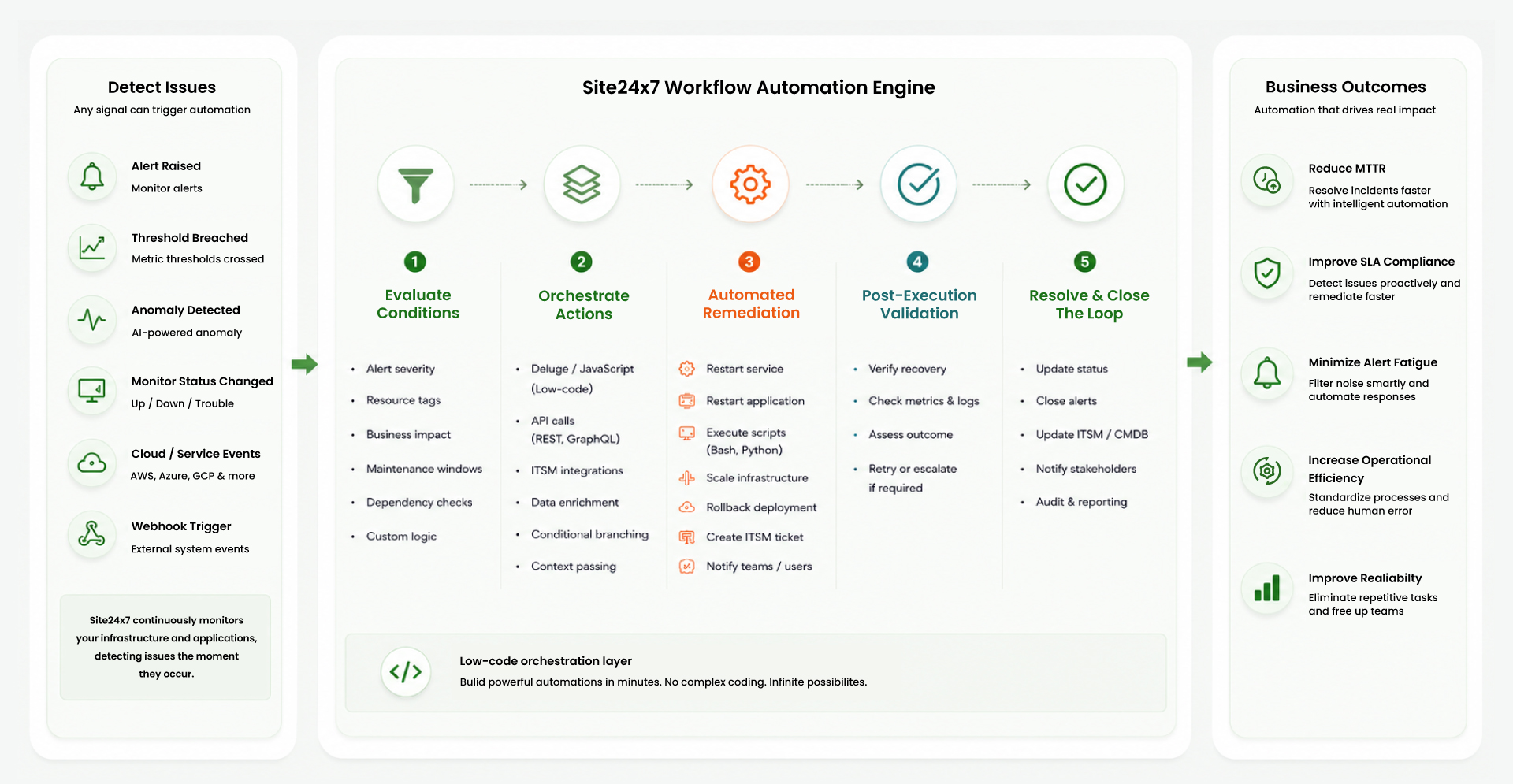
Workflow Automation automates incident response and remediation from end to end. When an alert is triggered, Workflows evaluate conditions, determine the appropriate course of action, execute IT Automation and Workflow Functions, and automatically update tickets, status pages, and stakeholders.
What you can do with Workflows
Build automated response pipelines that:
- Are triggered on any alert condition, status change, or schedule.
- Evaluate logic and conditions before deciding what to execute.
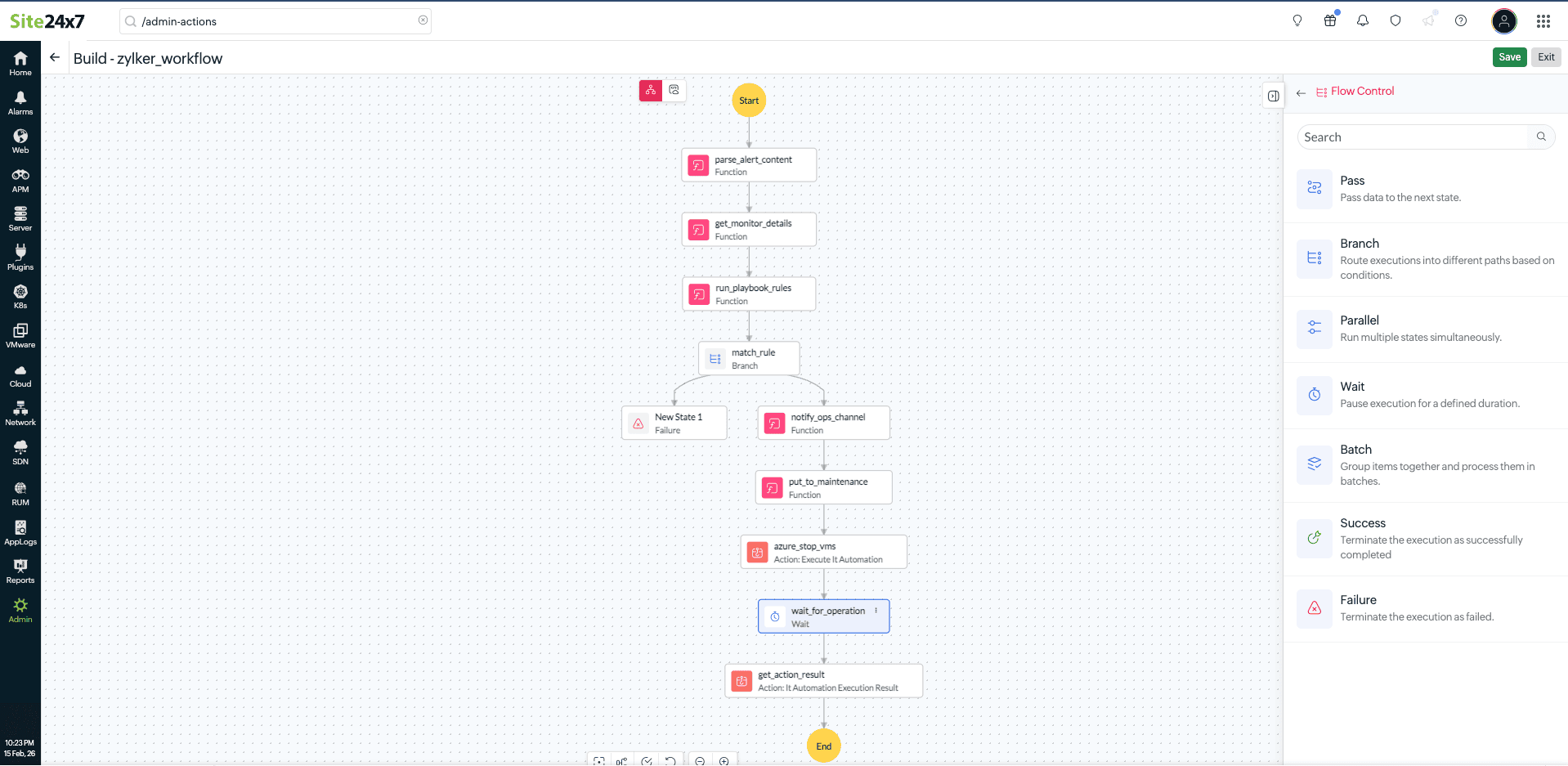
- Run IT Automation actions, like scripts, cloud operations, and API calls, in parallel.
- Pass data between steps using custom Workflow Functions.
- Notify teams, update ITSM records, or escalate the issues to the relevant team automatically.
Who it's built for
- Automate remediation in ITOM to minimize downtime and resolve issues faster: When a server crosses a CPU or memory threshold, Workflows can automatically restart the service, run a diagnostic script, and notify the on-call engineer—all before a ticket is even raised.
- Keep SLAs intact and streamline service delivery with ITSM automation: You can connect monitoring directly to your service desk. When an alert is triggered, Workflows can automatically create, update, or escalate tickets based on the incident severity. Once the issue is resolved, the ticket is updated automatically. You can also update your status pages with incident details.
- Strengthen your security posture with SIEM-driven threat response: When a threat or anomaly is detected, Workflows can isolate an affected resource, invoke a security API, correlate the event data, log it to your SIEM platform, and alert your security team.
- Optimize cloud costs and resource utilization with cloud operations automation: Automate your cloud resource management. Workflows can provision or decommission VMs; scale resources in response to load changes; invoke cloud provider APIs on AWS, Azure, or GCP; and send operational summaries to your team—triggered automatically by the conditions you define.
How it works
When an alert or a scheduled trigger is activated, the predefined Workflows are triggered, and the following actions take place:
- Workflow Automation runs upon alert generation: Workflows route execution down the right path based on the alert context, status, or threshold conditions.
- Workflow Functions and automations process and make decisions: They retrieve credentials, call APIs, validate configurations, and interact with ITSM or third-party services. Workflow Functions can be built using Zoho Deluge, JavaScript, and IT Automation, including cloud operations and server script executions. Outputs from one step can be passed to subsequent steps, enabling dynamic, context-aware automation.
- Wait states pause execution where needed: Execution is paused between steps to enable operations to complete before the flow moves forward.
- Every run is logged and auditable: Workflow Logs give your team full visibility into what ran, when, and why.
Get started
Whether you're automating first responses for infrastructure incidents or connecting monitoring to your service desk, Workflows can help. You can start by:
- Setting up your first Workflows.
- Exploring IT Automations.
- Learning about Workflow Functions.
Feel free to share your feedback in the comments. For further details, kindly contact our support team.
Best regards,
The Site24x7 team
Like (0)
Reply
Replies (0)