

Performance monitoring for Node.js applications
With Site24x7's APM Insight tool, you can monitor pivotal information such as application availability, uptime and downtime, resource usage, systems health, and latency to enhance the performance of your Node.js application.
Analyze code to resolve issues faster
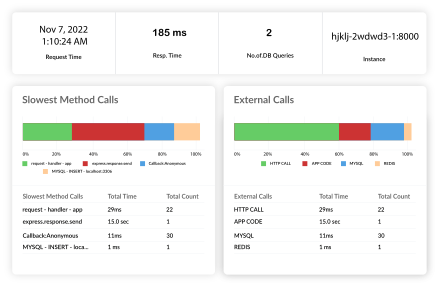
- Analyze your Node.js application down to the code level with precise timestamps to identify bottlenecks in real time.
- View the exact execution time of specific method calls with low overhead profiling.
- Gain a comprehensive view of the slowest method calls, detailing duration, count, and percentage of total time taken, so you can optimize code before it impacts business metrics.
Understand end user behavior
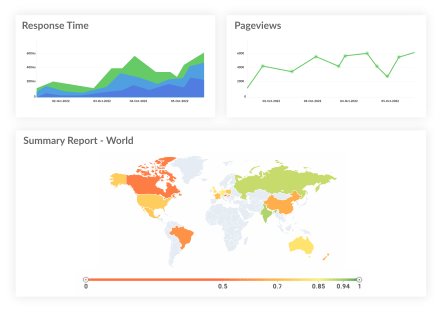
Understand the end-user behavior of your Node.js applications across various geographies with a comprehensive dashboard. By linking Node.js backend performance directly to user experience, you can prioritize fixes that matter most. Integrate real user monitoring (RUM) with Node.js APM to gain full-stack visibility and drastically improve the overall digital experience.
Minimize app downtime
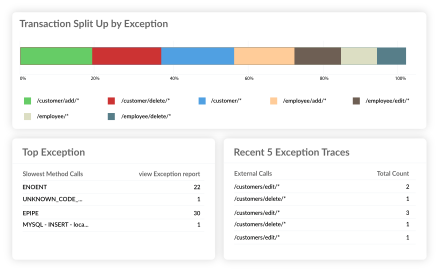
Identify errors in real time and view the top exceptions thrown by various components of your application to reduce the downtime experienced by your users. Get a comprehensive view of your top exceptions and errors, recent exception traces, list of error codes, and exception and error count in your Node.js application.
Troubleshoot efficiently
With Site24x7's Node.js application monitoring solution, you can start monitoring your Node.js application in real time within minutes. Powered by AI-assisted diagnostics and anomaly detection, you can proactively troubleshoot application performance issues before they affect users across distributed microservices environments. This reduces the mean time to resolution (MTTR) and eliminates the need for complex war rooms.
Supported components and frameworks
The Site24x7 Node.js performance monitoring tool supports various components and frameworks:








How does the Node.js monitoring tool work?
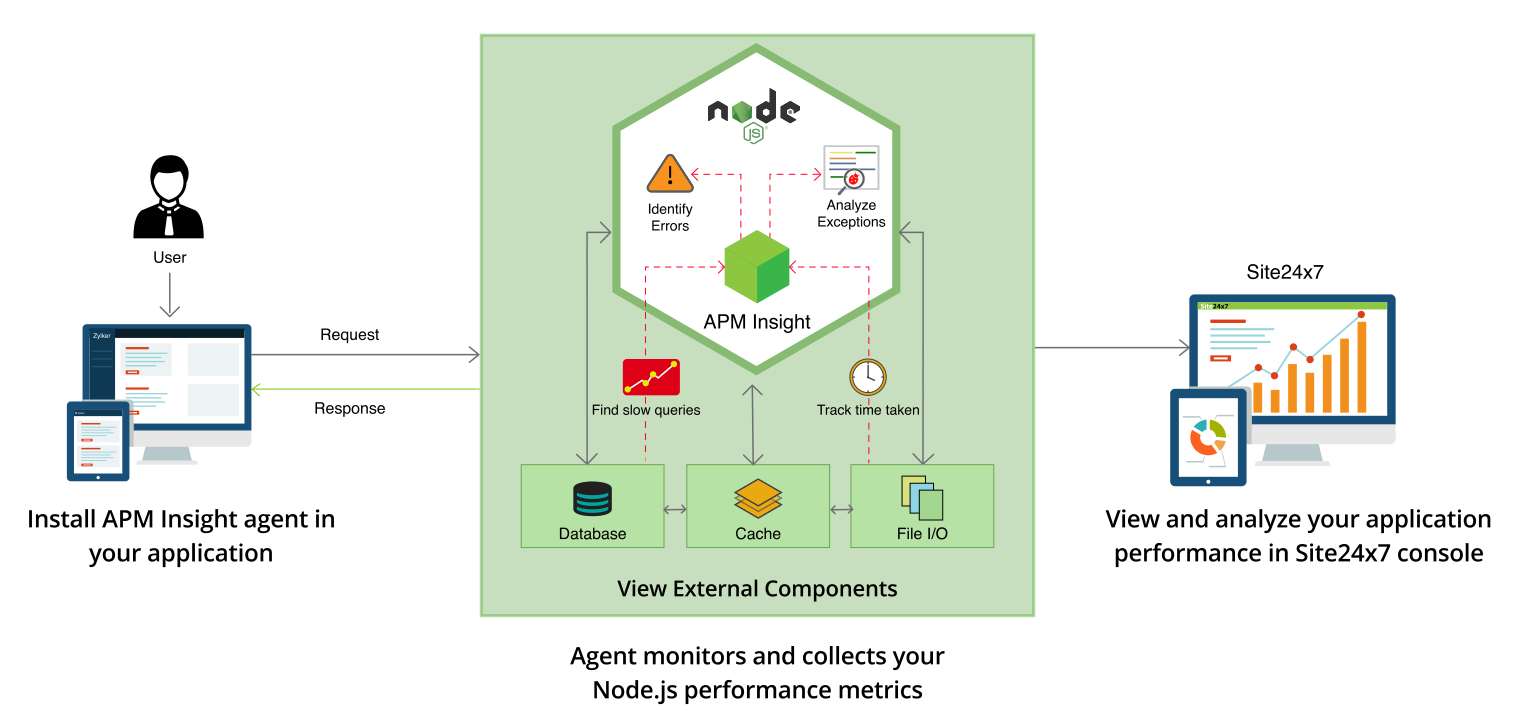
Node.js monitoring works by adding code to your application which will then trace the execution of the code and report back on it. To start monitoring your Node.js application, installing a monitoring agent like the Node.js agent in the application server is essential. The Node.js agent automatically captures incoming web requests like http, https, and http2. Additionally, use custom instrumentation APIs to analyze specific transactions or code blocks in your Node.js application, adding a more detailed perspective to your monitoring experience.
Kickstart your Node.js monitoring journey today by referring to our Node.js documentation for step-by-step guidance.
Key Node.js performance metrics to monitor
Apdex scores
The Application Performance Index (Apdex) provides a quick way to gauge user satisfaction with your Node.js application. It measures the ratio of satisfactory response times to unsatisfactory ones. Monitoring your Apdex score helps you understand if your application is meeting user expectations and where performance optimizations are needed.
Event loop delay
Node.js operates on a single-threaded event loop. If synchronous operations block the event loop, the entire application slows down. Tracking event loop delay allows you to identify CPU-intensive tasks and optimize them, ensuring your application remains responsive to incoming requests.
Error rates and exceptions
Frequent exceptions and high error rates directly impact the reliability of your application. Monitoring error rates at the transaction level helps you pinpoint problematic code paths and resolve issues before they affect a large number of users.
Garbage collection and memory usage
Inefficient garbage collection can lead to CPU spikes and increased response times. Monitoring heap memory usage and the frequency and duration of garbage collection pauses is crucial for maintaining a stable and performant Node.js application.
P95 and P99 latency
Average response times can hide extreme outliers. Tracking the 95th and 99th percentiles (P95/P99) gives you a true representation of the latency experienced by your most impacted users, enabling precise optimization for tail latency issues.
Cluster and process health
When scaling Node.js across multi-core systems using the cluster module or process managers like PM2, monitoring individual worker process health is essential. Track CPU and memory utilization per process to ensure high availability and balanced load distribution.
Troubleshooting memory leaks in Node.js
Memory leaks are a common performance bottleneck in Node.js applications. They occur when objects are no longer needed but are still referenced, preventing the garbage collector from freeing up memory. Over time, this leads to increased memory consumption and eventual application crashes.
Site24x7’s APM Insight Node.js agent provides deep telemetry with detailed heap dump analysis and tracks garbage collection metrics with near-zero overhead. By analyzing these metrics continuously, you can identify memory leaks early in your development or production cycles. Look for a steady increase in heap usage without a corresponding drop after garbage collection cycles. Once identified, our built-in profiling capabilities help you pinpoint the exact objects causing the leak so you can confidently optimize your code and maintain top-tier application stability.
